TacUNS 2.0 · Android firewall
Your phone's security gate
Every app is checked before it goes online. Fake websites, ads, trackers and spying apps stop here.
- Free
- No account
- Everything stays on your phone
- No ads, no tracking
- 15 languages
- Dark and Light look
Vibe Aegis: the 10-stage AI code & security auditor
Finds leaked secrets, unsafe code, risky dependencies and broken UI, then tries to disprove every finding before it reports or fixes it.
- Recon & Triage
- Security + UI/UX Hunters
- Adversarial Skeptic
- Evidence Referee
- Guarded Fixer
Read https://raw.githubusercontent.com/Tacuns/vibe-aegis/main/README.md and execute the Vibe Aegis setup and 10-stage First-to-Last audit in this repository.- Native Rust engine
- Fake-website shield
- TacUNS AI Radar
- TacUNS ExfilMeter
- TacUNS TrapLink
- TacUNS PacketTruth
- TacUNS GateLock
- Proof log
- App risk & Quarantine
- Per-app Wi-Fi / mobile data
- 15 languages
- No account
- No analytics
How it works
A firewall that lives on your phone
No root. No cloud. Your rules, applied on the phone before anything leaves it.
- Step 1
It runs on your phone
TacUNS uses Android's own VPN feature to look at connections on the phone itself. There is no TacUNS server in the middle, and no account.
- Step 2
Every app is checked
Before an app goes online, TacUNS checks the app and the website against your rules, the protection lists and the shields.
- Step 3
Bad stops, good goes
Blocked look-ups are answered on the phone and go nowhere. Allowed ones go to the DNS server you chose.
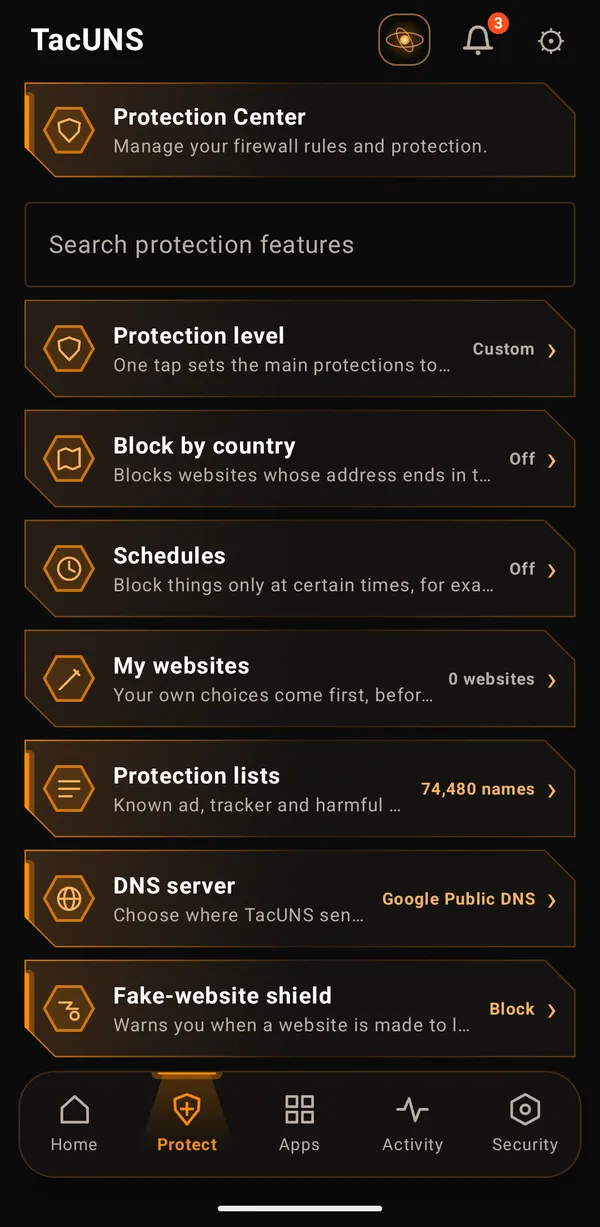
Protect tab
Protection Center
Manage your firewall rules and protection.
Protection level
One tap sets the main protections together: Normal, Strict (fake sites blocked, safe search) or Kids (plus YouTube Restricted Mode).
Block by country
Blocks websites whose address ends in a country's ending (like .cn). Websites you trust still open.
Schedules
Block things only at certain times, for example social media at night. Up to 3 schedules.
My websites
Your own choices come first, before any list. Block or allow any website.
Protection lists
Known ad, tracker and harmful websites from well-known public lists. Updated about once a day on Wi-Fi.
DNS server
Choose where TacUNS sends the look-ups it allows: Google, Cloudflare (encrypted), your network's own, or your own. Blocking always happens on your phone first.
Fake-website shield
Warns you when a website is made to look like a well-known one, for example arnazon.com instead of amazon.com. Checked on your phone.
Blocks work in every app
Some apps and browsers use their own private DNS, which would skip your blocks. TacUNS stops that.
Hidden aliases uncovered
Some trackers hide behind a harmless-looking name that points to them (a CNAME alias). TacUNS follows the alias and blocks the look-up when the real name is blocked.
Watch-only
Try your rules safely: TacUNS notes what it would block but lets it through.
Apps tab
Apps
Choose which apps may use Wi-Fi and mobile data.
Wi-Fi and mobile data, per app
Block any app on Wi-Fi, on mobile data, or both. Apps that share one Android identity are shown together.
AI agent mode in every app
For apps that act for you: keep an app to the places it already uses, and cap what it can send each day (TacUNS AgentScope).
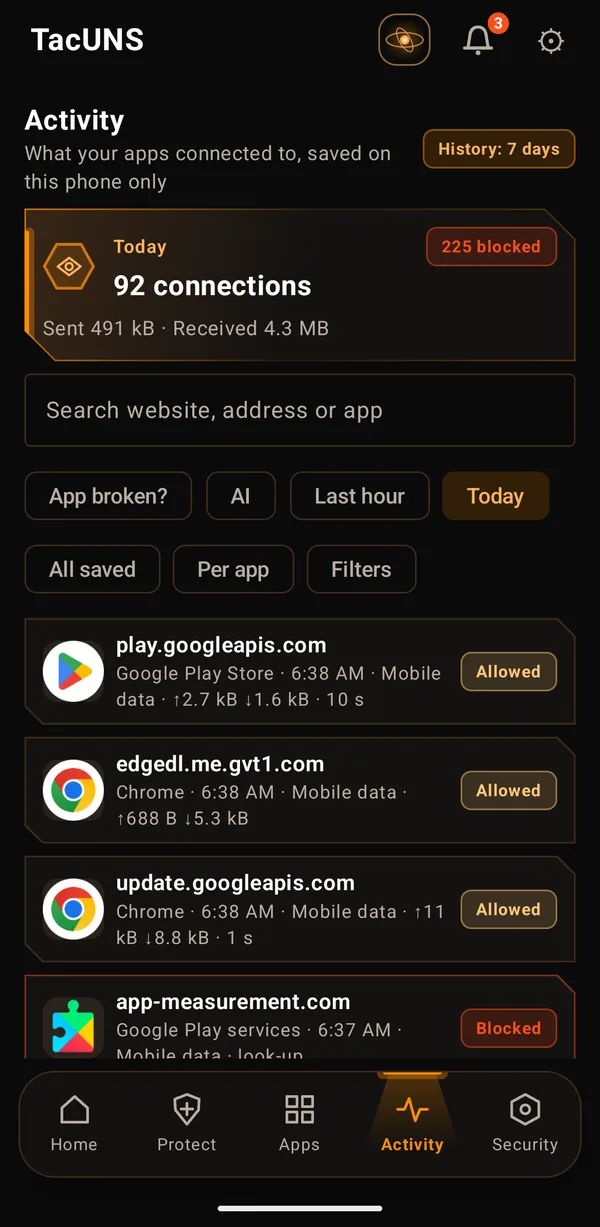
Activity tab
Activity
What your apps connected to, saved on this phone only.
Every connection, explained
Which app, which website, allowed or blocked and why. Search the whole saved history; you choose how long it is kept.
App broken?
One tap shows what was blocked in the last minute, with Allow for 15 minutes or Always trust.
Security tab
Security
What apps do behind your back.
App risk and Quarantine
Apps whose powers and network behaviour look risky, decided on the phone from the last 7 days. Nothing is blocked unless you tap Quarantine: then the app has no internet until you remove it.
TacUNS AI Radar
Apps that sent data to AI companies in the last 7 days, and stop it with one tap.
Agent Powers
Apps that can act for you or watch you: control the screen, read all notifications, device admin.
TacUNS ExfilMeter
What apps send out, live and today, with a daily upload limit per app.
TacUNS TrapLink
Catch apps that read your notifications: one decoy link that only a notification-reading app could know.
TacUNS PacketTruth
Spots network data made by hacking tools instead of normal apps.
Proof log
Every change to your protection, in order and sealed, so edits are seen. Never which websites you visited.
And more
Always with you
Built in, free.
TacUNS GateLock
Asks for your phone lock or your TacUNS passphrase before TacUNS opens. Rising waits after wrong tries, and a one-time recovery code.
Lockdown
Think something is wrong? Cut the internet for every app except the ones you choose, in one tap.
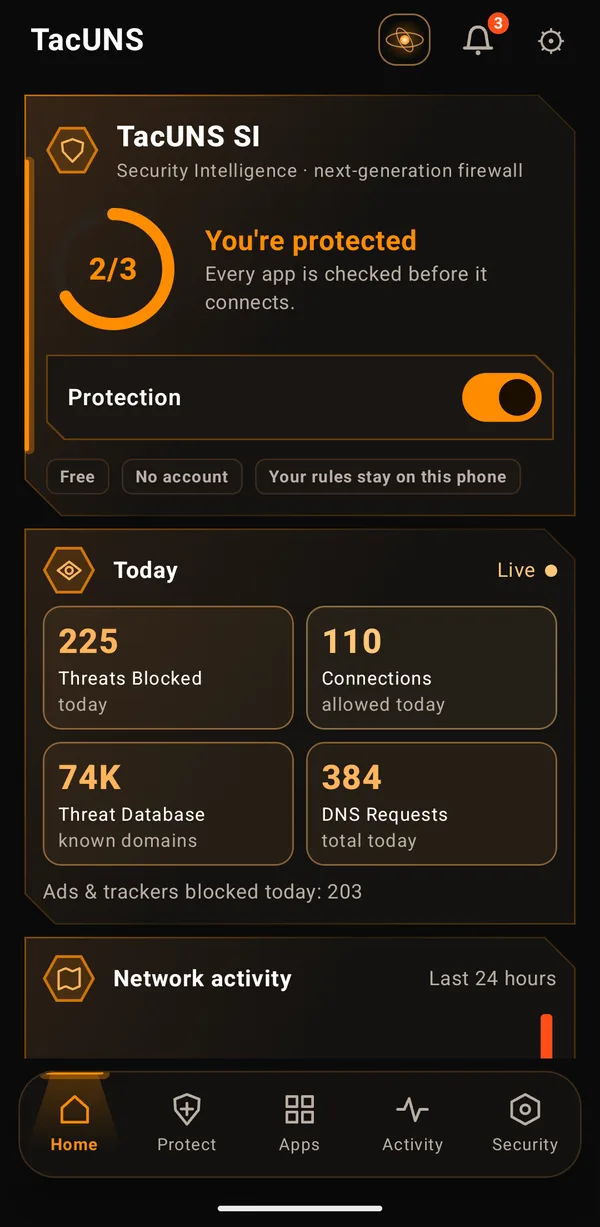
TacUNS SI
Security Intelligence: a plain-words briefing of your protection, and safety checks you can fix in one tap.
Built for the AI era
Protection that watches AI too
AI assistants and agents can read, tap and send on your behalf. TacUNS shows you when they do, and lets you set the limits.
- See which apps send your data to AI companies, and stop it with one tap.
- Know when an app gets power over your phone, like controlling your screen.
- See what each app uploads, and set a daily limit.
- AI apps cannot read TacUNS or turn it off.
Privacy
What stays on your phone, and what does not
TacUNS has no account and no analytics. Here is everything that ever leaves the phone, and why.
Stays on your phone
- Your rules, apps, schedules and settings
- Your activity history (you choose how long, or off)
- Alerts, the Proof log and your GateLock passphrase check
- Backups you save (a file in your Downloads folder)
Leaves the phone, only to do its job
- Allowed website look-ups, to the DNS server you choose
- Protection list downloads, from the lists' publishers
- Only if you agree: a one-time download of the on-phone SI model
Free for everyone